Python- basic structure & Comment
Good Morning Boys.
Welcome to the third session of the online classes for Python Programing.
Lets look at the solutions for the Exercise given yesterday.
1. happy_10- This is a valid identifier.
2. For-This is a valid identifier because although "for" is a reserved word but because here it begins with capital f "F", it cannot be treated as a reserved word. User can use it as an identifier.
3. for- This is an invalid identifier because it is a reserved word.
4. 10find-This is an invalid identifier because it is begins with a number.
5. Count- This is a valid identifier as it conforms to the rules of making a valid identifier.
6. Count 1-This is an invalid identifier because it is has a white space in between which is not allowed.
7. cout@1- This is an invalid identifier because it uses a special symbol "@" which is not allowed. Only underscore is allowed while creating a valid identifier.
8. 1count-This is an invalid identifier because it is begins with a number.
9. Count_1- This is a valid identifier as it conforms to the rules of making a valid identifier.
10. if- This is an invalid identifier because it is a reserved word.
11. if#-This is a valid identifier as it conforms to the rules of making a valid identifier.
12. while- This is an invalid identifier because it is a reserved word.
13. while 2-This is an invalid identifier because it is has a white space in between which is not allowed.
14. while_2-This is a valid identifier as it conforms to the rules of making a valid identifier.
15. while.nd- This is an invalid identifier because it uses a special symbol "." which is not allowed. Only underscore is allowed while creating a valid identifier.
16. while2-This is a valid identifier as it conforms to the rules of making a valid identifier.
I hope the concept is clear. Doubts if any, can be shared on the group.
______________________________________________________________________________
By the end of the session today, you will be able to understand
(The content needs to be copied in registers)
NOTE- The content of the blog is available even after the class is over. In case you are unable to copy, Come back and complete after the other classes are over)
We know that the data processing goes through 3 stages in order to convert DATA into the desired INFORMATION-
 1. INPUT
2. PROCESSING
3. OUTPUT
So, in order to solve any problem , the programmer has to identify:
1. What he wants the program to give ( desired output-INFORMATION)?
2. What is the input needed(DATA needed ) ?
Once this is done, the programmer has to perform the following steps:
1. create variables to accept data from the user. (Following the rules of forming identifiers as discussed yesterday).
2. Accept values from the user (Using INPUT() function)
3. Follow steps to do the necessary processing. (Using assignment statements)
4. Display the result to the user. (Using OUTPUT() function)
One very important point at this stage is discuss the importance of "Comments".
A comment is text that doesn’t affect the outcome of a code, it is just a piece of text to let someone know what you have done in a program or what is being done in a block of code. This is especially helpful when someone else has written a code and you are analysing it for bug (error) fixing or making a change in logic, by reading a comment you can understand the purpose of code much faster then by just going through the actual code.
Welcome to the third session of the online classes for Python Programing.
Lets look at the solutions for the Exercise given yesterday.
1. happy_10- This is a valid identifier.
2. For-This is a valid identifier because although "for" is a reserved word but because here it begins with capital f "F", it cannot be treated as a reserved word. User can use it as an identifier.
3. for- This is an invalid identifier because it is a reserved word.
4. 10find-This is an invalid identifier because it is begins with a number.
5. Count- This is a valid identifier as it conforms to the rules of making a valid identifier.
6. Count 1-This is an invalid identifier because it is has a white space in between which is not allowed.
7. cout@1- This is an invalid identifier because it uses a special symbol "@" which is not allowed. Only underscore is allowed while creating a valid identifier.
8. 1count-This is an invalid identifier because it is begins with a number.
9. Count_1- This is a valid identifier as it conforms to the rules of making a valid identifier.
10. if- This is an invalid identifier because it is a reserved word.
11. if#-This is a valid identifier as it conforms to the rules of making a valid identifier.
12. while- This is an invalid identifier because it is a reserved word.
13. while 2-This is an invalid identifier because it is has a white space in between which is not allowed.
14. while_2-This is a valid identifier as it conforms to the rules of making a valid identifier.
15. while.nd- This is an invalid identifier because it uses a special symbol "." which is not allowed. Only underscore is allowed while creating a valid identifier.
16. while2-This is a valid identifier as it conforms to the rules of making a valid identifier.
I hope the concept is clear. Doubts if any, can be shared on the group.
______________________________________________________________________________
By the end of the session today, you will be able to understand
- Importance of identification of desired output
- Importance of understanding the input needed for the desired purpose.
- The 3 stages of information processing
- The purpose/need for input( ) and Print( ) functions
- Step by step breaking down of processing statement
- Purpose and types of COMMENT statements.
(The content needs to be copied in registers)
NOTE- The content of the blog is available even after the class is over. In case you are unable to copy, Come back and complete after the other classes are over)
We know that the data processing goes through 3 stages in order to convert DATA into the desired INFORMATION-

2. PROCESSING
3. OUTPUT
So, in order to solve any problem , the programmer has to identify:
1. What he wants the program to give ( desired output-INFORMATION)?
2. What is the input needed(DATA needed ) ?
Once this is done, the programmer has to perform the following steps:
1. create variables to accept data from the user. (Following the rules of forming identifiers as discussed yesterday).
2. Accept values from the user (Using INPUT() function)
3. Follow steps to do the necessary processing. (Using assignment statements)
4. Display the result to the user. (Using OUTPUT() function)
One very important point at this stage is discuss the importance of "Comments".
A comment is text that doesn’t affect the outcome of a code, it is just a piece of text to let someone know what you have done in a program or what is being done in a block of code. This is especially helpful when someone else has written a code and you are analysing it for bug (error) fixing or making a change in logic, by reading a comment you can understand the purpose of code much faster then by just going through the actual code.
Types of Comments in Python
There are two types of comments in Python.
1. Single line comment
2. Multiple line / Multi-line comment
1. Single line comment
2. Multiple line / Multi-line comment
Single line comment
In python we use # special character to start the comment. Lets take few examples to understand the usage.
# This is just a comment. Anything written here is ignored by Python
Multi-line comment:
To have a multi-line comment in Python, we use triple single quotes at the beginning and at the end of the comment, as shown below.
'''
This is a
multi-line
comment
'''
Python Comments Example
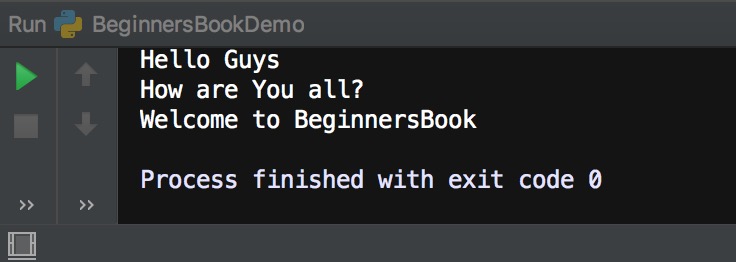
In this Python program we are seeing three types of comments. Single line comment, multi-line comment and the comment that is starting in the same line after the code.
'''
We are writing a simple program here
First print statement.
This is a multiple line comment.
'''
print("Hello Guys")

# Second print statement
print("How are You all?")

print("Welcome to BeginnersBook") # Third print statement
Output:
# character inside quotes
When # character is encountered inside quotes, it is not considered as comment. For example:
print("#this is not a comment")
Output:
#this is not a comment


Good Morning.Please mark your attendance , along with your name as you enter class
ReplyDeletegood morning mam -
ReplyDeleteAshish
Good morning ma'am
ReplyDeleteClement
Good morning ma'am
ReplyDeleteTejas
Good morning dear
DeleteThis comment has been removed by the author.
ReplyDeleteClement , I want you to be very careful while reading. Anything not clear, pls post query immediately. Programing is to be systematically learnt.
DeleteOK maam
DeleteGood morning ma'am
ReplyDelete-Geet
Good morning dear. pls be on time . you are late today
DeleteSure mam.
DeleteWill be careful from tomorrow.
Good morning dear. pls be on time . you are late today
ReplyDeleteYou all must check your answers carefully. Reason has been given to facilitate understanding.
ReplyDeleteOk ma'am
Deleteyes mam
DeleteGOOD MORNING MAAM
ReplyDeleteHi Aaron. You are more than half hour late for the class. Pls be on time
DeleteGood morning mam - brian
ReplyDeleteGood morning. You are very late Brian.
DeleteAll are requested to share doubts regarding the topics covered. The comment section is available beyond the class timings.
ReplyDeleteAs shared earlier, we may not get time to review the concept being covered.in the blog.
Good morning ma'am
ReplyDelete