Python-Decision Making
Good Morning dear students.
Lets us start one of the most important topic of your syllabus today, "DECISION MAKING"
-----------------------------------------------------------------------------------------------------------------------
Today's link for the Google meet is as follows:
IMPORTANT INSTRUCTIONS:
1. Separate attendance for all periods.
2. All work to be copied in registers, Exercise to be done as per instructions.
--------------------------------------------------------------------------------------------------------------------
By the end of this session, you will be able to understand and apply the concepts of
- Decision making
- purpose and syntax of IF statements
- purpose and syntax of IF-ELSE statements
- purpose and syntax of Nested IF statement
---------------------------------------------------------------------------------------------------------------------------
Python If-else statements
Decision making is the most important aspect of almost all the programming languages. It is anticipation of conditions occurring while execution of the program and specifying actions taken according to the conditions.
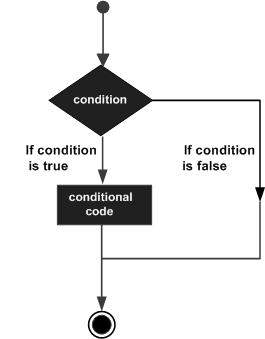
Decision structures evaluate multiple expressions which produce TRUE or FALSE as outcome. You need to determine which action to take and which statements to execute if outcome is TRUE or FALSE otherwise.
Following is the general form of a typical decision making structure found in most of the programming languages −
Python programming language assumes any non-zero and non-null values as TRUE, and if it is either zero or null, then it is assumed as FALSE value.
As the name implies, decision making allows us to run a particular block of code for a particular decision. Here, the decisions are made on the validity of the particular conditions. Condition checking is the backbone of decision making.
In python, decision making is performed by the following statements.
| Statement | Description |
|---|---|
| If Statement | The if statement is used to test a specific condition. If the condition is true, a block of code (if-block) will be executed. |
| If - else Statement | The if-else statement is similar to if statement except the fact that, it also provides the block of the code for the false case of the condition to be checked. If the condition provided in the if statement is false, then the else statement will be executed. |
| Nested if Statement | Nested if statements enable us to use if ? else statement inside an outer if statement. |
Indentation in Python
For the ease of programming and to achieve simplicity, python doesn't allow the use of parentheses for the block level code. In Python, indentation is used to declare a block. If two statements are at the same indentation level, then they are the part of the same block.
Generally, four spaces are given to indent the statements which are a typical amount of indentation in python.
Indentation is the most used part of the python language since it declares the block of code. All the statements of one block are intended at the same level indentation. We will see how the actual indentation takes place in decision making and other stuff in python.
The if statement
The if statement is used to test a particular condition and if the condition is true, it executes a block of code known as if-block. The condition of if statement can be any valid logical expression which can be either evaluated to true or false.
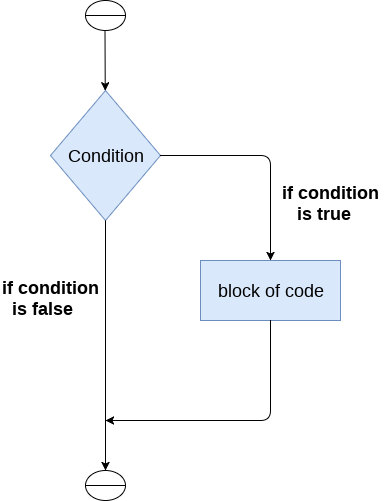
The syntax of the if-statement is given below.
Example 1
Output:
enter the number?10
Number is even
Example 2 : Program to print the largest of the three numbers.
Output:
Enter a? 100
Enter b? 120
Enter c? 130
c is largest
The if-else statement
The if-else statement provides an else block combined with the if statement which is executed in the false case of the condition.
If the condition is true, then the if-block is executed. Otherwise, the else-block is executed.
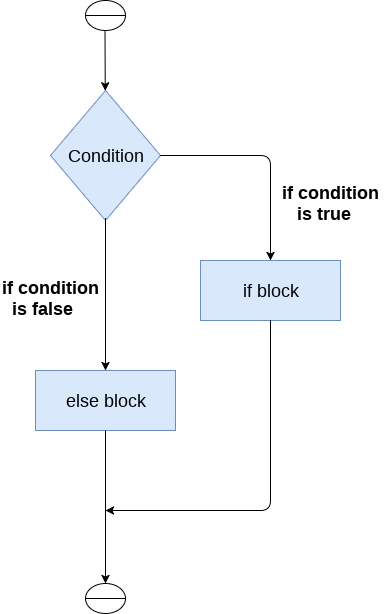
The syntax of the if-else statement is given below.
Example 1 : Program to check whether a person is eligible to vote or not.
Output:
Enter your age? 90
You are eligible to vote !!
Example 2: Program to check whether a number is even or not.
Output:
enter the number?10
Number is even
The elif statement
The elif statement enables us to check multiple conditions and execute the specific block of statements depending upon the true condition among them. We can have any number of elif statements in our program depending upon our need. However, using elif is optional.
The elif statement works like an if-else-if ladder statement in C. It must be succeeded by an if statement.
The syntax of the elif statement is given below.
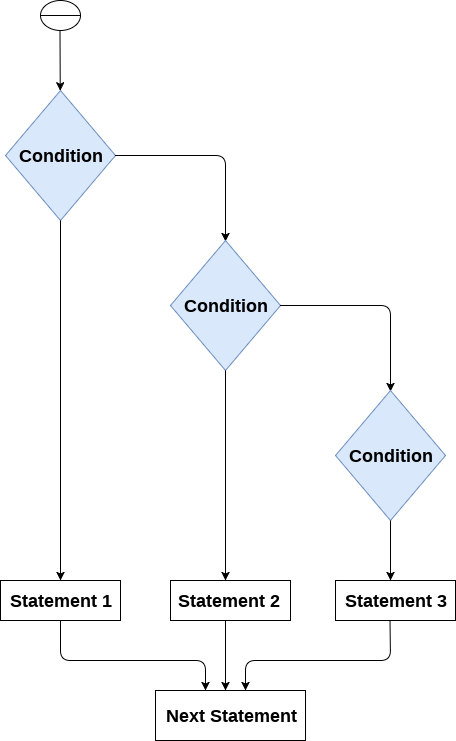
Example 1
Output:
Enter the number?15
number is not equal to 10, 50 or 100
Example 2
EXERCISE
- All boys are requested to try all the programs discussed in the class today.
- There will be an online test based on the topics covered in the coming few days. Please prepare accordingly.
NOTE- WORK DONE SO FAR- H.W as well as CW MUST REACH ME BY TOMORROW EVENING ON MY GMAIL ID without fail
git@stcolumbas.edu.in
git@stcolumbas.edu.in


Good morning ma'am
ReplyDelete-Geet
good morning mam
ReplyDelete-Ashish
Ma'am sorry for late the blog was not opening and my phone get switched off.
ReplyDeletegood morning ma'am
ReplyDelete-Artham
ma'am sorry for being late there was an internet problem
ReplyDelete-Artham
Good morning mam
ReplyDeleteSahil
Good morning ma'am
ReplyDeleteBrian
Good morning mam
ReplyDelete