REVIEW- IF construct
Good Morning Boys
The Google meet link for today's class is
------------------------------------------------------------------------------------------------------------
By the end of the session, you will be able to
Let us watch this video to take a recap of the topic on IF statement
----------------------------------------------------------------------------------------------------------------------
For this session, the following questions have to be done by you. I shall take up the solution after you have tried your hands at given questions:
Q1. Write a Python program to convert temperatures from celsius to fahrenheit.
Formula : c/5 = f-32/9
(where c = temperature in celsius and f = temperature in fahrenheit )
Q3. Accept marks in 5 subjects from the user and find the average marks obtained. (average marks=sum of marks obtained/5)
The Google meet link for today's class is
By the end of the session, you will be able to
- Understand the basic decision construct in Python
- Understand and apply the basic IF statement
- Understand and apply the basic IF -else statement.
- Understand and apply the basic IF-elif-else statement
- Apply the concepts learnt to solve the given problems.
Python - Decision Making
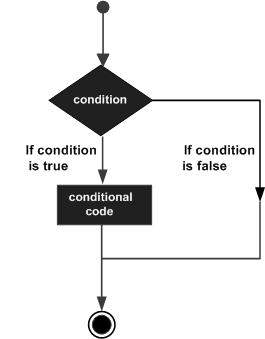
Decision making is anticipation of conditions occurring while execution of the program and specifying actions taken according to the conditions.
Decision structures evaluate multiple expressions which produce TRUE or FALSE as outcome. You need to determine which action to take and which statements to execute if outcome is TRUE or FALSE otherwise.
Following is the general form of a typical decision making structure found in most of the programming languages −
Python programming language assumes any non-zero and non-null values as TRUE, and if it is either zero or null, then it is assumed as FALSE value.
Python programming language provides following types of decision making statements. Click the following links to check their detail.
| Sr.No. | Statement & Description |
|---|---|
| 1 | if statements
An if statement consists of a boolean expression followed by one or more statements.
|
| 2 | if...else statements
An if statement can be followed by an optional else statement, which executes when the boolean expression is FALSE.
|
| 3 | nested if statements
You can use one if or else if statement inside another if or else if statement(s).
|
Let us go further −
Single Statement Suites
If the suite of an if clause consists only of a single line, it may go on the same line as the header statement.
Here is an example of a one-line if clause −
#!/usr/bin/python

var = 100
if ( var == 100 ) : print "Value of expression is 100"
print "Good bye!"
When the above code is executed, it produces the following result −
Value of expression is 100
Good bye!
Let us watch this video to take a recap of the topic on IF statement
----------------------------------------------------------------------------------------------------------------------
For this session, the following questions have to be done by you. I shall take up the solution after you have tried your hands at given questions:
Q1. Write a Python program to convert temperatures from celsius to fahrenheit.
Formula : c/5 = f-32/9
(where c = temperature in celsius and f = temperature in fahrenheit )
Conversion formula:
T(℉) = T(℃) x 9/5 + 32
Or,
T(℉) = T(℃) x 1.8 + 32
See this example:
Output:
EXERCISE
Q2: Accept two integer numbers from a user and return their product and if the product is greater than 1000, then return their sum
Q3. Accept marks in 5 subjects from the user and find the average marks obtained. (average marks=sum of marks obtained/5)


Good morning mam
ReplyDeleteAshish
Good morning mam
ReplyDelete-Aaron David
Good morning ma'am
ReplyDeleteBrian
Good Morning Ma'am
ReplyDelete